Chess Scribe

Chess Scribe allows you to upload and convert your chess PGN files into publishable quality PDF files, along with diagrams and annotations.
Built with
NextJS | ExpressJS | TypeScript | Docker | LaTeX
The Brief
Allow a user to upload their chess PGN files and convert them into publishable quality PDF files.
Method
For this project to work, there are a number of steps that need to be achieved:
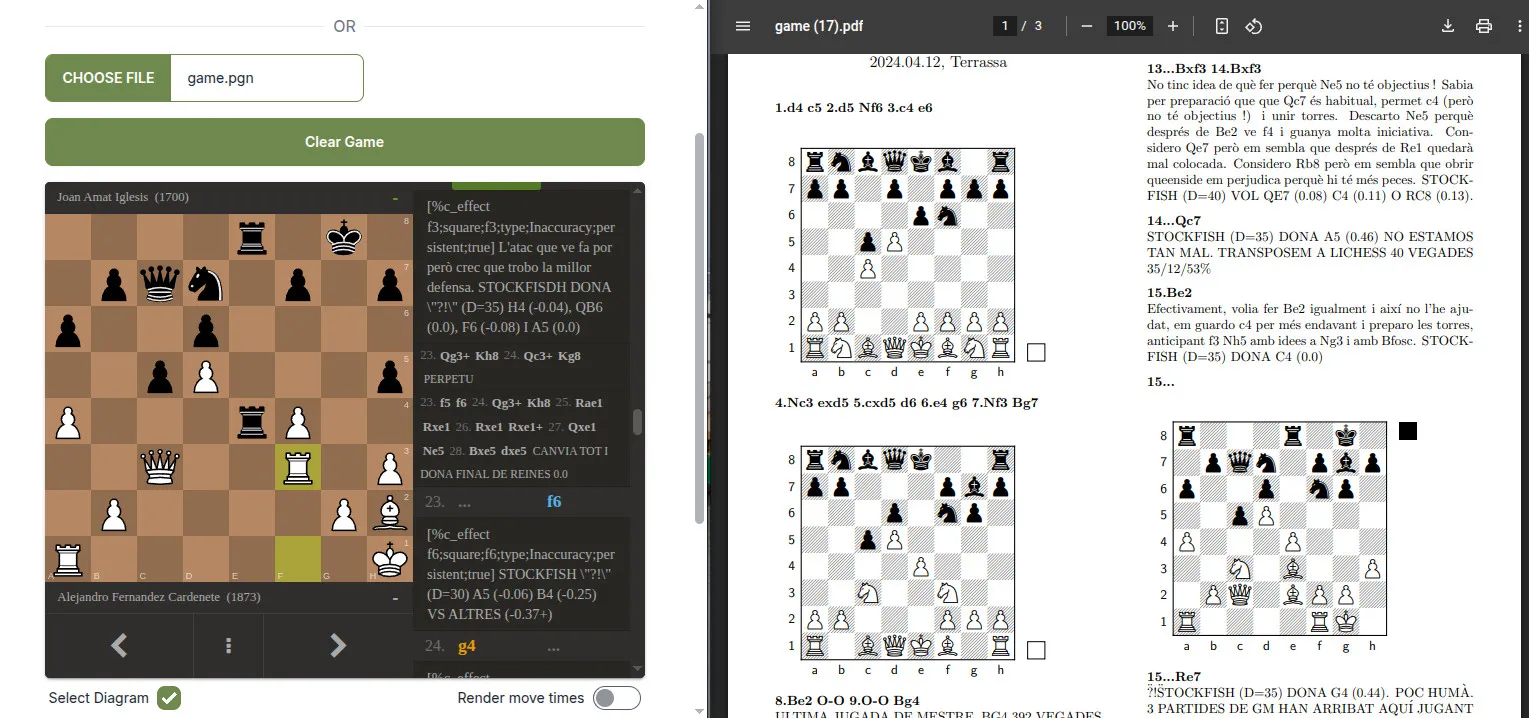
- Display a PGN file on a chessboard so that the game is traversable - Lichess PGN Viewer
- Parse a PGN file. This is no easy task, so I relied on mliebelt’s PGN Parser. This allows us to edit the header, and take the parts of the game that are needed for our diagrams as FEN strings
- Allow the user to choose which positions they want to display as an image on the PDF. Custom event listeners/handlers and DOM manipulation was used, tailored to match the chessboard position with the parsed PGN file object
- Convert the PGN file to LaTeX Markdown, using a library that I wrote - PGN2Tex
- Take the LaTex Markdown plus an object of selected positions and pass to a custom TexLive server that I created - node-xskak. This is available on Dockerhub
The backend of this project is written with ExpressJS, from where the TexLive docker container is spun up on request, calling pdflatex. The xskak package is required to render the images and annotations correctly. Great care was taken to make this TexLive server as slim as possible, installing only the packages that are required for this to work.
Learning Opportunities
The opportunities for learning here were plentiful. Becoming familiar with LaTeX was at the top of my list because of how integral it is to the whole project.
Staying away from state management libraries until they are absolutely needed, one of the key learning opportunities in this project was implementing complex state management using React’s useReducer hook instead of multiple useState hooks. This choice provided valuable insights into:
-
Advanced State Management Patterns: Moving beyond simple state updates to a more structured approach using actions and reducers. This pattern helps maintain predictability in state updates and scales better with increasing application complexity.
-
Centralized State Logic: Learning to consolidate related state updates in a single reducer function, rather than spreading state logic across multiple
useStatehooks. This made the code more maintainable and easier to debug. -
Action-Based Updates: Understanding how to model state changes as explicit actions, which provides better visibility into how the application’s state evolves over time. For example, the game state handles actions like
SET_GAME,ADD_DIAGRAM, andTOGGLE_DIAGRAM_CLOCKin a clear, predictable manner.
export const gameReducer = (state: GameProps, action: GameAction) => {
  switch (action.type) {
    case 'SET_GAME':
      return {
        pgn: action.payload.pgn,
        headers: action.payload.headers,
        diagrams: [],
        diagramClock: false
      }

    case 'CLEAR_GAME':
      return initialGameState

    case 'SET_HEADERS':
      return {
        ...state,
        headers: action.payload
      }

    case 'ADD_DIAGRAM':
      return {
        ...state,
        diagrams: [...state.diagrams, action.payload]
      }

    case 'DELETE_DIAGRAM':
      return {
        ...state,
        diagrams: state.diagrams.filter((diagram: DiagramProps) => diagram.ply !== action.payload.ply)
      }

    case 'TOGGLE_DIAGRAM_CLOCK':
      return {
        ...state,
        diagramClock: action.payload,
      }

    default:
      return state
  }
}
The useReducer version centralises all this logic in one place and makes the state transitions more explicit and maintainable.